Set up Wi-Fi
The display opens its own Wi-Fi so you can tell it your network and your server.
Connect to the display
- On your phone or computer, join the Wi-Fi
GlanceBox-XXXXshown on the display. It has no password. - Most phones open the setup page by themselves. If not, open
http://192.168.4.1.
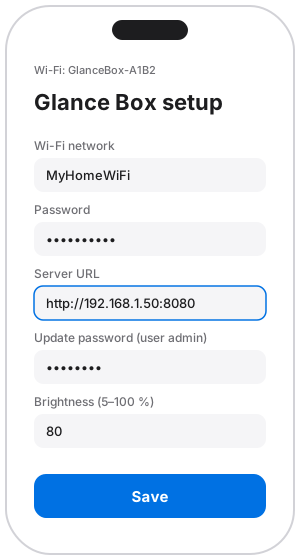
Fill in the form
- Tap Configure WiFi and choose your 2.4 GHz network, then enter its password.
- Server URL: the address from step 2, for example
http://192.168.1.50:8080. Onlyhttp://works. - Update password: a new password you choose, 8 to 32 characters, no umlauts. You need it for updates and for changing settings. The user name is always
admin. - Brightness: 5 to 100 %. You can change it later with a slider.
- Tap Save.
The display restarts, joins your Wi-Fi and shows its IP address, then the first page from your server.
Do it right away
Until you save, the setup Wi-Fi is open to anyone nearby. More on this: What to know about security.