clock
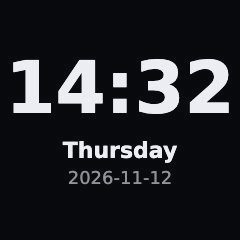
What it shows
The time in large digits, below it the weekday and the date. It is the smallest useful page and the starting point for your own pages.
What you need
Nothing. The page needs no network access, no account and no key.
Example
- type: clock
  lang: en
  refresh: 60
Options
| Key | Default | Meaning |
|---|---|---|
lang |
top-level lang |
de or en. Sets the language of the weekday and the date format (14.11.2026 or 2026-11-14). |
duration |
interval |
How many seconds the page stays on the display. |
refresh |
duration |
How often the page is rendered again. Once a minute (60) is enough. |
duration and refresh work on every page, see Server configuration. The time zone comes from the top-level timezone.
Setup
- Add the example above to the
pages:list inconfig.yaml. - Restart the server:
docker compose restart. - Open
http://<server>:8080/and check the preview.
To build your own page from it, copy pages/clock to pages-custom/mypage and edit it, as described in Writing pages.
Privacy & security
The page makes no network requests and stores nothing. It reads only the server's clock.
When something is wrong
- The time is off by an hour: set the top-level
timezone(for exampleEurope/Berlin). The default isEurope/Berlin. - The weekday is in the wrong language: set
lang: enorlang: deon the page, or the top-levellang. - The server refuses to start with
lang must be 'de' or 'en': only these two values exist.