bahn
What it shows
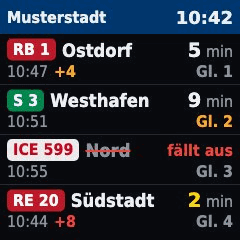
The next departures of a German station, as on a station board. Each row has the line as a badge (S-Bahn green, long distance white and red, RB/RE red), the destination, the minutes until departure and the platform.
- The minutes turn yellow at 3 or less.
- A delay appears as
+4, orange below 6 minutes and red from 6. - The platform is orange if it changed.
- Cancelled trains are struck through in red and say "fällt aus".
The text on the page is German ("Keine Daten", "Keine Abfahrten", "fällt aus", "Gl.").
What you need
- Internet access for the server. The data comes from DBF (db-infoscreen), a free service that republishes Deutsche Bahn data. No account and no key.
- The exact name of your station as DBF knows it.
Example
- type: bahn
  station: "Frankfurt(Main)Hbf"
  via: [Wiesbaden, Mainz]
  platforms: "101,102"
  limit: 4
  title: "Frankfurt"
  refresh: 60
Options
| Key | Default | Meaning |
|---|---|---|
station |
required | Station name, EVA number or DS100 code. Find the exact name on dbf.finalrewind.org: the part of the address after the search. |
via |
all | Only trains that stop at one of these places after your station (text or list). Intermediate stops work better than final destinations, because they also catch trains that end earlier. |
platforms |
all | Only these platforms (text or list). |
limit |
4 |
Rows, 1 to 6. Fewer rows mean bigger text. |
title |
the station | Header text. |
dbf_url |
https://dbf.finalrewind.org |
Address of a DBF instance, if you run your own. |
refresh |
60 |
At least 60. This is DBF's rule of one request per station and minute. If you do not set refresh it is raised to 60 automatically. If you set a value below 60 the server refuses to start. |
duration |
interval |
How many seconds the page stays on the display. |
Setup
- Open dbf.finalrewind.org, search for your station and copy the station name from the address.
- Add the example to the
pages:list inconfig.yamlwith yourstation. Start withoutviaandplatforms, add them once the board works. - Restart the server:
docker compose restart. - Open
http://<server>:8080/and check the preview.
Several stations are several pages, each with its own station.
Privacy & security
- Every refresh sends the station name and your filters to DBF (or to the instance in
dbf_url). DBF also sees the IP address of your server. - The page needs no key, so there is no secret to protect.
- Nothing is stored on the server beyond the current picture.
When something is wrong
- "Keine Daten": DBF could not be reached or did not know the station. The page shows this at once instead of an old picture, because old minutes would count down wrongly. The reason is in
docker compose logs. Check the station name on dbf.finalrewind.org. - "Keine Abfahrten": DBF knows the station, but nothing matches. Loosen
viaandplatforms. - The server does not start and complains about
refresh: the value is below 60. Remove it or raise it. - A train you expect is missing: with
viaonly trains that stop at that place after your station count. Try an intermediate stop instead of the final destination. - Developer notes: the code and layout are in
pages/bahn/.