weather
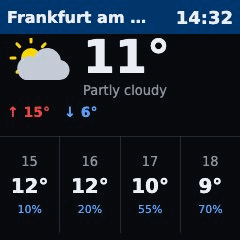
What it shows
The current weather for one place: an icon, the temperature in large digits and a short description. Below it the day's high (red) and low (blue), and the next four hours with temperature and chance of rain.
The description and the title follow the page language (de or en).
What you need
- Internet access for the server. The data comes from Open-Meteo, a free weather service. No account and no key.
- A place name, or its coordinates.
Example
- type: weather
  location: Frankfurt am Main
  lang: en
Options
| Key | Default | Meaning |
|---|---|---|
location |
Place name, looked up once through the Open-Meteo geocoding service. Use this or latitude and longitude. |
|
latitude, longitude |
Coordinates in degrees (for example 50.11 and 8.68). Always set both, and never together with location. |
|
title |
the found place name, else Weather |
Header text. |
lang |
top-level lang |
de or en. Sets the description and the default title. |
refresh |
duration, at least 60 |
Seconds between two new pictures, at least 60. The picture and its clock stay current, but Open-Meteo is asked at most every 15 minutes, because weather changes slowly and the service is free. If the value is below 60 the server refuses to start. |
duration |
interval |
How many seconds the page stays on the display. |
The time zone comes from the top-level timezone. The four hours are the next four full hours in that zone, also across midnight.
Setup
- Add the example to the
pages:list inconfig.yamlwith yourlocation. - Restart the server:
docker compose restart. - Open
http://<server>:8080/and check the preview.
If the place is not the one you meant, add the country or region to the name, or use latitude and longitude instead.
Privacy & security
- The page needs no key, so there is no secret to protect.
- With
locationthe place name goes to Open-Meteo once per server start. Every forecast request (at most every 15 minutes) sends the coordinates of the place. Open-Meteo also sees the IP address of your server. - Nothing is stored on the server beyond the current picture.
- Open-Meteo data is licensed under CC BY 4.0, see open-meteo.com/en/license.
When something is wrong
- The page keeps showing an old picture: Open-Meteo could not be reached. The last picture stays for up to 10 minutes, after which the display skips the page. The reason is in
docker compose logs. location not foundin the log: the geocoding service does not know the name. Try another spelling or uselatitudeandlongitude.- The server refuses to start and names
location: use eitherlocationor both coordinates, never both forms. - The server refuses to start and complains about
refresh: the value is below 60. Remove it or raise it. - The hours or the clock are off: set the top-level
timezone(for exampleEurope/Berlin).